👋 Hey there, tech explorer!
I’m Vikas Sankhla, Full Stack Developer and your friendly mentor from Web Codder.
Today, I’m going to explain Target Groups in AWS — think of them like air traffic controllers, directing traffic to the right container at the right time! 🛫🛬
Let’s learn how they work, how to use them with load balancers, and how to keep your apps smooth and fast! 💨
🧠 What is a Target Group?
Imagine you run a food delivery app 🍔. When someone orders food, you need to send that request to the right restaurant kitchen.
In AWS, the Target Group is like that kitchen list — it tells the Load Balancer which backend services (containers or EC2 instances) should handle the request.
📦 Basic Terms to Know
| Term | Meaning |
|---|---|
| Load Balancer | Distributes traffic across servers 🚦 |
| Target Group | A list of places (targets) where traffic should go 🎯 |
| Target | A container, EC2, or Lambda that handles traffic 🖥️ |
| Health Check | A test to see if the target is alive ✅ |
| Routing Rule | Tells AWS where traffic should go based on path, weight, etc. 🧭 |
🔗 How Target Groups Work with Load Balancers
Let’s make it super simple 💡:
textCopyEditUser → Load Balancer → Target Group → Healthy Container
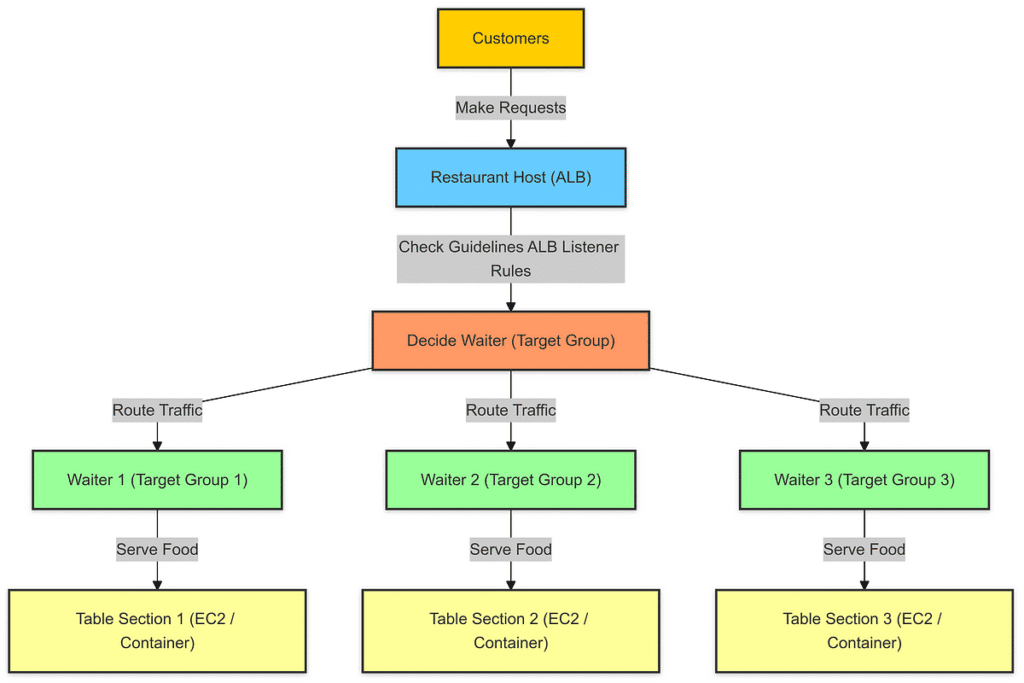
➡️ When someone opens your app, the Load Balancer checks the Target Group.
➡️ The Target Group sends the traffic to a healthy ECS container.
➡️ If the container is sick (failing health checks), it gets skipped! 🏥❌
🧁 Analogy: Bakery Example
- Load Balancer = The guy at the counter taking cake orders 🎂
- Target Group = The list of bakers in the kitchen
- Target = Each baker (ECS container)
- Health Check = “Hey baker, are you awake and ready?”
- Routing = Decide which baker makes chocolate, which makes vanilla 😄
🛠️ Step-by-Step: Configuring Target Groups in AWS
Let’s set up a Target Group that routes traffic to ECS containers.
👣 Step 1: Create a Target Group
- Go to EC2 Dashboard in AWS Console.
- Click on Target Groups.
- Choose:
- Target Type = IP or ECS (based on setup)
- Protocol = HTTP or HTTPS
- Port = 80 (or your app port)
- VPC = Same VPC as your ECS service
📝 Give your Target Group a name like: myapp-target-group
🩺 Step 2: Set Up Health Checks
Health checks are super important.
They make sure only working containers get traffic! 💪
Choose:
- Protocol: HTTP
- Path:
/health(or whatever your app uses) - Healthy threshold: 3
- Unhealthy threshold: 2
- Interval: 30 seconds
🎯 This keeps traffic flowing to only healthy containers.
🔀 Step 3: Attach Target Group to Load Balancer
- Go to your Application Load Balancer.
- Add a Listener on port 80 or 443.
- Add a Rule:
- Forward to →
myapp-target-group
- Forward to →
🔥 Now traffic flows to your app like magic!
🧪 Example: Routing with Target Groups
Let’s say you have two versions of your app running:
| Version | Target Group Name | Container Version |
|---|---|---|
| v1 | myapp-prod-v1-target | v1 |
| v2 | myapp-prod-v2-target | v2 |
You can do:
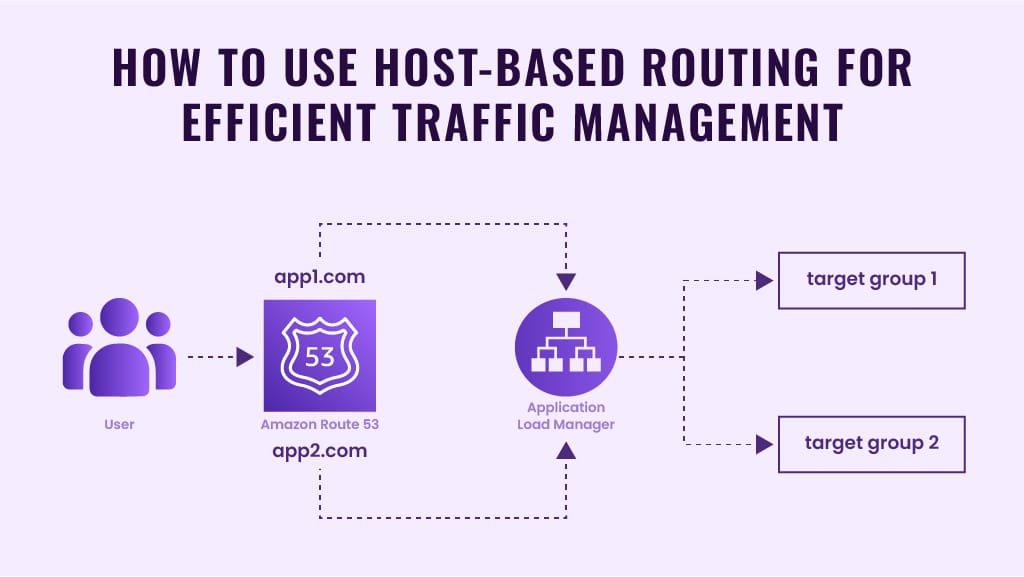
🔵 Path-Based Routing:
textCopyEdit/web → myapp-prod-v1-target
/api → myapp-prod-v2-target
So, different parts of your site go to different containers! 🧠
⚖️ Weighted Routing (for A/B Testing)
Want to try a new version of your app slowly?
You can split traffic:
- 80% of users → v1
- 20% of users → v2
AWS calls this weighted routing.
It’s great for blue/green deployments or A/B testing.
📝 Sample config (in rule editor):
jsonCopyEdit{
  "forwardConfig": {
    "targetGroups": [
      {
        "targetGroupArn": "arn:v1",
        "weight": 80
      },
      {
        "targetGroupArn": "arn:v2",
        "weight": 20
      }
    ]
  }
}
🧼 Best Practices for Target Groups
| Best Practice ✅ | Why It Helps 🧠 |
|---|---|
| Always enable health checks | Keeps traffic going only to healthy containers |
| Use path-based routing for microservices | Better organization |
| Use weighted routing for updates | Smooth rollouts |
| Monitor with CloudWatch | Catch issues early |
Use proper names like myapp-prod-api | Easy management |
📊 Infographic – How Traffic Flows Through Target Groups
🧠 In Short: Why Target Groups Matter
- They keep your app online, smooth, and smart.
- You can route traffic however you like: by path, by weight, or both.
- You can do safe rollouts, microservice routing, and traffic splitting like a pro 💥.
🎁 Bonus Tip: Use Multiple Target Groups!
Running multiple microservices?
Just create one Target Group per microservice and route each /service path properly.
It makes scaling and debugging super easy! 🔍
🙌 Let’s Stay Connected!
Did this article make Target Groups crystal clear?
Want more guides like this on ECS, Docker, and AWS?
📺 Subscribe to my channel: Web Codder on YouTube
📸 Follow me on Instagram: @web_codder_official
💬 Chat with me on WhatsApp: lightgrey-chamois-101255.hostingersite.com/whatsapp