
Hey awesome coders! 👋 It’s Vikas Sankhla here, founder of Web Codder, and today, we’re tackling something super exciting:
👉 Taking your React app LIVE for the world to see! 🌎✨
Building an app is cool. But showing it to real users? Even cooler. 😎
🧐 What Does “Deployment” Mean?
Think of your app like a school project.
- 📒 You work on it at home (your local machine).
- 🏫 But you want to show it to your teacher and friends.
To do that, you bring it to school (put it online).
That’s what deployment is:
➡️ Moving your app from your computer to the internet so everyone can use it.
🌐 Best Places to Deploy React Apps
There are lots of services that make deployment super easy.
Here’s a simple table 👇:
| 🌟 Platform | 🚀 Best For | 💸 Cost |
|---|---|---|
| Netlify | Super easy & fast setup | Free + Paid |
| Vercel | Great for Next.js & React apps | Free + Paid |
| Heroku | Good for full-stack apps | Free + Paid |
| AWS S3 | Big projects, full control | Paid |
| GitHub Pages | Simple static sites | Free |
🎯 My Top Picks
If you’re just starting out:
✅ Netlify & Vercel are your best friends.
They are:
- 😄 Free (for basic use)
- 🛠 Easy to set up
- 🚀 Fast to deploy
Let’s see how to deploy step by step! 👇
🛠 Step-by-Step: Deploy to Netlify
1️⃣ Build Your App
First, make sure your app is ready for production.
Run this in your terminal:
bashCopyEditnpm run build
✅ This creates a build/ folder.
It’s like a packed lunch 🍱—everything your app needs is inside.
2️⃣ Push to GitHub
- 📂 Make sure your code is on GitHub.
- Not yet? Run:
bashCopyEditgit init
git add .
git commit -m "First commit 🚀"
git remote add origin YOUR_GITHUB_REPO_URL
git push -u origin main
3️⃣ Connect to Netlify
- Go to Netlify.
- Log in (GitHub account works best).
- Click ➕ “New site from Git.”
- Connect your repo.
Boom 💥! Netlify builds and deploys automatically.
4️⃣ Get Your Link 🌐
Netlify gives you a free link, like:
Done! ✅
🚀 Step-by-Step: Deploy to Vercel
Almost the same steps!
1️⃣ Build your app (yes, again 😉):
bashCopyEditnpm run build
2️⃣ Push to GitHub.
3️⃣ Go to Vercel.
4️⃣ Click “New Project” → Import GitHub Repo.
5️⃣ Vercel auto-detects React and deploys it for you.
🎉 Done! You’ll get a nice .vercel.app URL.
🔐 Environment Variables: Keeping Secrets Safe
Imagine you have:
- 🔑 API keys
- 🗺 URLs that change between development and production
You don’t want to hardcode them in your app. That’s risky! ❌
Instead, use Environment Variables.
👀 Example
In your code:
jsxCopyEditconst apiUrl = process.env.REACT_APP_API_URL;
➡️ In Netlify:
- Go to Site Settings → Environment Variables.
- Add:
| Key | Value |
|---|---|
| REACT_APP_API_URL | https://myapi.com |
✅ Done!
Vercel & others have similar settings.
🏗 The Magic of npm run build
What happens when you run:
bashCopyEditnpm run build
🔍 React does this:
- ✅ Minifies your code (makes it tiny)
- ✅ Bundles everything (puts files together)
- ✅ Optimizes for speed
Your app becomes a static site—super fast 🚀 and easy to host.
🔄 Continuous Deployment: Set It & Forget It 🔧
This is SO COOL.
After you connect GitHub to Netlify/Vercel:
- Every time you push new code to GitHub,
- 💥 Your site updates automatically.
No more manual uploads! 🕺
👨💻 Other Deployment Options (for Pros)
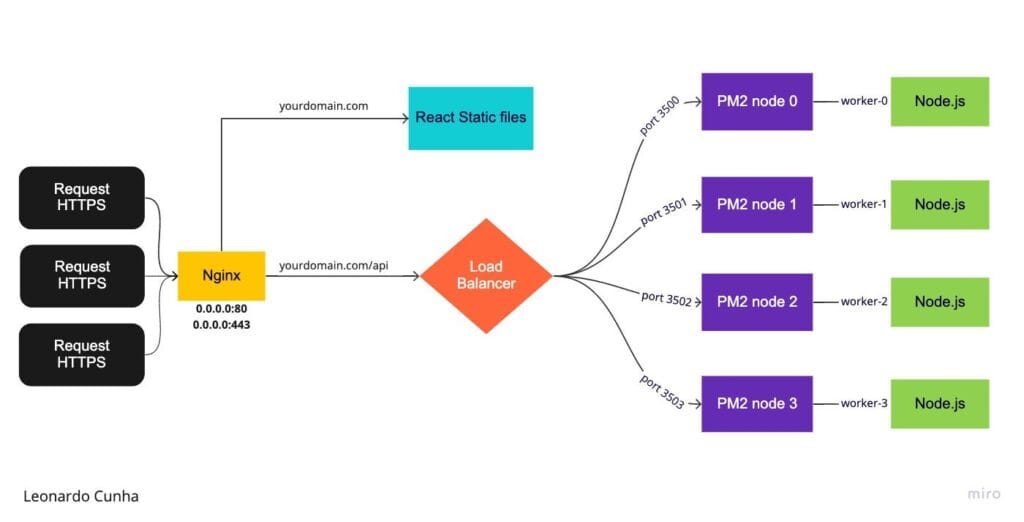
- Heroku: Great if you have a backend (Node.js, Express).
- AWS S3 + CloudFront: Best if you want full control + global speed.
- GitHub Pages: Perfect for simple static sites.
✅ Quick Recap Table
| Step | What You Do |
|---|---|
| Build Your App | npm run build |
| Push to GitHub | Upload your code to a GitHub repo |
| Connect to Host | Link your GitHub repo to Netlify/Vercel/etc. |
| Set Env Variables (Optional) | Add API keys & URLs safely |
| Continuous Deployment | Push code → Auto update |
🏁 Conclusion: You’re Live!
Wow, look at you! 🚀 You’ve learned:
- What deployment means ✅
- How to deploy with Netlify & Vercel ✅
- Using environment variables ✅
- Continuous deployment magic ✅
Your app is online and ready to impress! 🌟
👉 Don’t forget to subscribe & follow for more awesome tutorials:
Let’s keep building amazing things together! 💪