Hey little coder! 👋 I’m Vikas Sankhla, your tech buddy from Web Codder. Today, we’re going to explore JavaScript – the magic language that makes web pages come alive! ✨🧑💻
🚀 What is JavaScript?
JavaScript is the brain of a website. 🧠
It helps you make things move, pop up, slide, or react when someone clicks a button.
Without it, a webpage would be like a photo – pretty but boring. 😅

🔤 Variables – The Boxes That Store Stuff
Think of variables as boxes where we can store different kinds of data.
📦 Example:
let name = "Vikas";
let age = 21;
let isCool = true;
Here we created three boxes: one for a string, a number, and a boolean. 👍
📘 Data Types:
| Type | Example |
|---|---|
| String | “Hello” |
| Number | 25, 3.14 |
| Boolean | true, false |
| Array | [1, 2, 3] |
| Object | {name: “Vikas”} |
| Null | null |
| Undefined | undefined |
🧾 Declaring Variables: var, let, and const
var– Old way. Can be buggy if not careful. 😬let– Modern and safe. Use it for values that change.const– Use when the value should NOT change.
🧪 Example:
var score = 100;  // can be updated
let user = "Ravi"; // can be updated
const pi = 3.14;   // can’t be updated
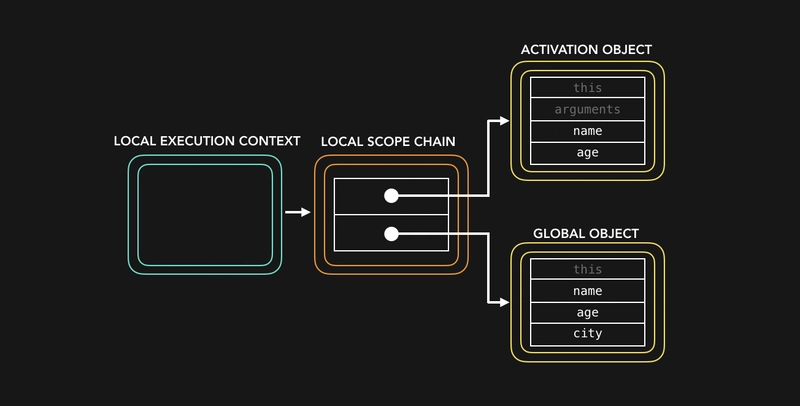
🌍 Scope – Where Can You Use Your Variable?
Scope tells us where a variable can be used.
🗂️ Types of Scope:
- Global Scope – Outside everything. Available everywhere.
- Local Scope – Inside a function.
- Block Scope – Inside
{ }, like loops orifblocks.
🔍 Example:
let name = "Vikas"; // global

function greet() {
  let message = "Hello"; // local
  console.log(message + name);
}

if (true) {
  let mood = "Happy"; // block
}
🧙♂️ Hoisting – JavaScript’s Magic Trick
JavaScript moves var declarations to the top of the file before running. 🎩✨
But it doesn’t do that with let or const.
⚠️ Example:
console.log(a); // undefined
var a = 5;

console.log(b); // Error ❌
let b = 10;
➕ Operators – Do Math and More
JavaScript has many operators to do stuff.
🧮 Basic Operators:
| Type | Symbol | Example |
|---|---|---|
| Addition | + | 5 + 3 = 8 |
| Subtraction | – | 7 – 2 = 5 |
| Multiplication | * | 4 * 3 = 12 |
| Division | / | 10 / 2 = 5 |
| Modulus | % | 9 % 2 = 1 |
| Assignment | = | let x = 5 |
| Comparison | ==, === | x === 5 |
🔁 Control Flow – Making Decisions
Sometimes, your code needs to make choices.
✅ If-Else:
let age = 18;
if (age >= 18) {
  console.log("You can vote");
} else {
  console.log("Too young to vote");
}
🔄 Else-If:
let score = 70;
if (score > 90) {
  console.log("A Grade");
} else if (score > 60) {
  console.log("B Grade");
} else {
  console.log("Try again!");
}
🔀 Switch:
let fruit = "apple";
switch (fruit) {
  case "apple":
    console.log("Red fruit");
    break;
  case "banana":
    console.log("Yellow fruit");
    break;
  default:
    console.log("Unknown fruit");
}
⚡ Ternary Operator:
let isLoggedIn = true;
let message = isLoggedIn ? "Welcome!" : "Please log in.";
console.log(message);
📚 Recap Table
| Concept | Use |
|---|---|
| Variable | Store values |
| Data Types | Different kinds of data |
| var/let/const | Declare variables |
| Scope | Where a variable works |
| Hoisting | Moves var to the top |
| Operators | Do math & compare |
| Conditionals | Make decisions |
📌 Conclusion
Now you know how JavaScript helps you talk to the web like a superhero! 🦸♂️💻
Keep practicing with small examples.
You’ll be building awesome interactive websites in no time! 🚀
🔔 Subscribe for more: YouTube/Web Codder
📚 Learn more here: WebCodder Automation
💬 Join our chat: WhatsApp Community
See you in the next adventure! 🧑💻🌐