
Topic: Storing Docker Images the Smart Way
👋 Hello Coder Buddy!
Hey there, I’m Vikas Sankhla, your tech guide and big bro from Web Codder! 💻
Today we’re going to learn something super useful if you’re working with Docker and AWS — it’s called Amazon ECR.
Don’t worry if it sounds scary. I’ll break it down step-by-step. Let’s go! 🚀
🔍 What is Amazon ECR?
Think of Amazon ECR (Elastic Container Registry) as a photo album 📸 — but instead of photos, it stores Docker images.
You create Docker images on your computer. But you need a safe place to keep them online so others (or AWS) can use them anytime.
That place = ECR 🗂️
🧱 Why Do We Need ECR?
Here’s a simple problem:
You made a super cool app in a Docker image. Now you want to run it on AWS ECS (Elastic Container Service). But how will ECS get your Docker image?
➡️ That’s where ECR comes in!
It acts like a Dropbox for Docker images. ECS pulls your image from ECR and runs it. Easy!
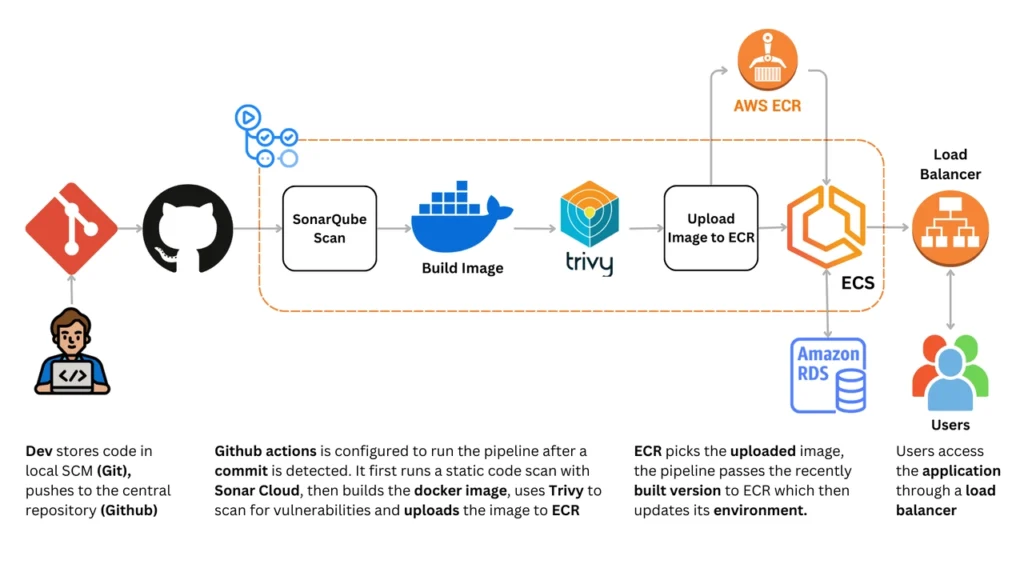
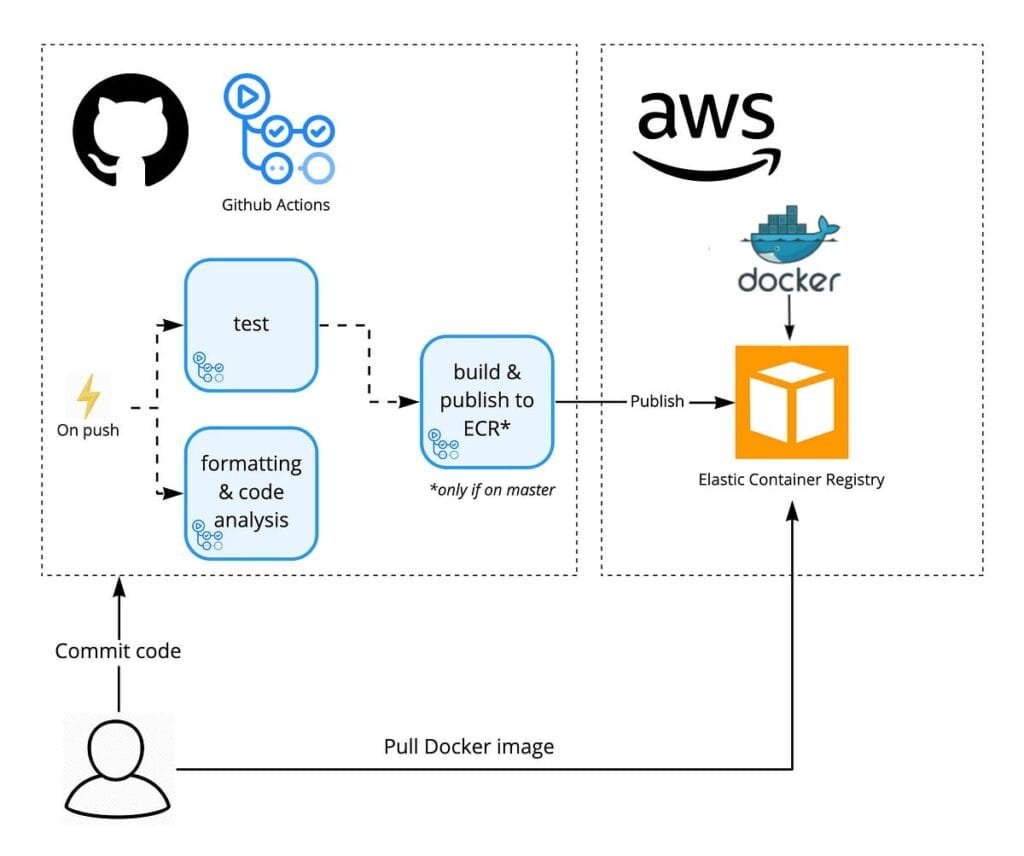
🧰 How Does Amazon ECR Work With Docker & ECS?
💡 Quick Flow:
- You build a Docker image locally.
- You push it to ECR.
- ECS (or EC2, or any cloud service) can pull the image from ECR and run it.
bashCopyEdit# You: Build & Push Image
docker build -t myapp .
docker tag myapp:latest <aws_account_id>.dkr.ecr.<region>.amazonaws.com/myapp
docker push <aws_account_id>.dkr.ecr.<region>.amazonaws.com/myapp

# ECS: Pull Image
ECS pulls this image and runs it in a container 🚀
🛠️ Step-by-Step: Push Docker Image to ECR
Let’s break this down like LEGO bricks 🧱
🧪 1. Create a Repo in Amazon ECR
bashCopyEditaws ecr create-repository --repository-name myapp
ECR gives you a URL like this:
bashCopyEdit123456789012.dkr.ecr.us-east-1.amazonaws.com/myapp
Copy this! You’ll need it soon 🔐
🔐 2. Login to ECR from Your Local Machine
bashCopyEditaws ecr get-login-password | docker login \
--username AWS \
--password-stdin 123456789012.dkr.ecr.us-east-1.amazonaws.com
✅ This logs your Docker client into ECR so you can push images.
📦 3. Tag Your Docker Image
bashCopyEditdocker tag myapp:latest 123456789012.dkr.ecr.us-east-1.amazonaws.com/myapp
This tells Docker: “Hey, send this image to that repo!”
📤 4. Push Your Image to ECR
bashCopyEditdocker push 123456789012.dkr.ecr.us-east-1.amazonaws.com/myapp
🎉 Boom! Your image is now in the cloud!
📥 Pull Image from ECR (from any machine)
Want to run your image from another server?
Just login to ECR and pull:
bashCopyEditdocker pull 123456789012.dkr.ecr.us-east-1.amazonaws.com/myapp
🛡️ Securing ECR with IAM (Access Control)
ECR works with IAM (Identity and Access Management) to control who can:
- Push images 📤
- Pull images 📥
- Delete or update repositories 🗑️
👮 Best Practice:
- Give developers
pushandpullaccess only. - ECS services only need
pullaccess. - Always use IAM roles, not hard-coded credentials!
📝 Sample IAM Policy:
jsonCopyEdit{
  "Version": "2012-10-17",
  "Statement": [
    {
      "Effect": "Allow",
      "Action": [
        "ecr:GetDownloadUrlForLayer",
        "ecr:BatchGetImage",
        "ecr:GetAuthorizationToken"
      ],
      "Resource": "*"
    }
  ]
}
✅ Best Practices for Using Amazon ECR
Let’s keep things clean and fast! 🧼⚡
| Best Practice 🧠 | Why? 🧐 |
|---|---|
Tag your images properly (v1, latest, prod) | Makes image versioning easy |
| Clean up unused images | Saves storage costs 💸 |
| Automate with CI/CD | Speed up deployments 🚀 |
| Enable image scanning | Find vulnerabilities 🔐 |
| Use IAM roles, not access keys | Better security 🔒 |
📊 Infographic – ECR in Action
🎓 Recap Time!
Let’s quickly revise what we learned today:
- ECR = A storage place for Docker images 🧊
- You can push images from your computer to ECR
- ECS and others can pull these images to run apps
- IAM helps you secure who can do what
- Always follow best practices to stay clean and safe! 💡
🎯 What’s Next?
Now that your image is in ECR, we’ll soon learn how to deploy it using AWS ECS and handle traffic with a load balancer. Stay tuned! 🎥
🙌 Conclusion – Join Our Tech Family!
Did this guide make AWS ECR feel simple and fun?
Then help me grow our Web Codder family! 🌱
📺 Subscribe: YouTube – Web Codder
📸 Follow: Instagram @web_codder_official
💬 Talk to me: Chat on WhatsApp